![[logo] US EPA](http://www.epa.gov/epafiles/images/logo_epaseal.gif)
AQS Web Application Change Log
AQS User,
A software patch will be installed tomorrow morning, August 12, 2010 before normal business hours.
The following bugs were corrected with this patch.
1. Browse Annual Summary - The Browse Annual Summary module was updated to display the pollutant standard description for displayed records. This revision had been omitted when the 2008 Exceptional Event Rule was implemented.2. Maintain Raw Data - The maintain raw data module was updated to correct the following problems: (1) The event creation capability was not operational when a sample value had multiple qualifier codes in addition to a request exclusion code. (2) The security restriction for querying data with a screening group assigned did not restrict data from a monitor owned by a different screening group. (3) The query did not retrieve all production status data when in the read only mode.
3. Maintain Composite Data - The query did not retrieve all production status data when in the read only mode.
4. Raw Data Load - The raw data load processing was modified to reject sample values with flow units The flow units are included in a valid protocol to allow submission of precision & accuracy data.
5. Maintain Monitor - The processing was modified to copy the CSA or CBSA information with the monitoring objective when the button "Duplicate Monitor" is clicked.
6. Load precision transaction - The load was modified to create an error message for a transaction where a "null" data code was reported in place of a value instead of failing without any processing.
7. Batch Job submission - The screen was modified to display a meaningful error message if a user accidentally submitted two batch jobs at the same time. Currently, a meaningless Oracle message is displayed.
8. Current data/Old data Update - The software was modified to correct problems when updating old data (pre 1993). This will simplify updating old data but will still require special processing by NADG staff.
Also, a new QA flag has been defined: "SS - Value substituted from secondary monitor". This QA flag has been assigned to sulfur dioxide to allow this condition to be flagged in AQS as required by the new NAAQS regulations promulgated on June 22, 2010.
Please contact me if you have any questions.
Jake Summers
National Air Data Group
OID/OAQPS/OAR/EPA
C339-04
Research Triangle Park, NC 27711
(919) 541-5695 (Phone)
(919) 541-7674 (Fax)
summers.jake@epa.gov
Changes to AQS based on the 2008 Lead NAAQS Standard –
Software Release Notes for July 15, 2010
The 2008 Lead NAAQS requirements have now been fully implemented in the Air Quality System (AQS).
The AQS changes are a result of the revision to the National Ambient Air Quality Standards (NAAQS) for lead that became effective November 12, 2008. The standards are defined in 40 CFR Parts 50, 51, 53, and 58 and the enhancements to AQS are based on the analysis of 40 CFR Part 50, Appendix R Interpretation of the National Ambient Air Quality Standards for Lead.
Changes are as follows:
- The 2008 Lead NAAQS established the reporting of lead at local conditions, which correspond to the following parameters in AQS: 14129 (Lead (Tsp) at local conditions FRM/FEM) and 85129 (Lead Pm10 at local conditions FRM/FEM.) (These parameters were made available to AQS users in 2009. See 5/1/2009 memo and Technical Note - Lead Data Reporting to AQS at http://www.epa.gov/ttn/airs/airsaqs/memos/.)
- Site-level combination of daily lead data
The 2008 Lead NAAQS calculations are based on site-level summaries, similar to the PM2.5 NAAQS standard. This allows samples missing from the primary monitor to be replaced by a sample reported by a collocated monitor, ie, the site-level combination of daily data. Therefore, when creating a new lead monitor using the parameter codes for reference or equivalent methods (ie, 14129 or 85129), there is an additional site-level requirement: a primary monitor must be designated for every lead monitor using “Maintain Site” within AQS, even though there may not be a collocated sampler.
- New summary statistics
The 1978 lead NAAQS was based on calendar quarters; the 2008 lead NAAQS is based on “rolling” 3-month averages. AQS now computes the summary statistics, including monthly means and 3-month means, at the combined site-level for the new lead parameters.
- The Data Completeness Report (AMP430) now includes the lead parameters 14129 and 85129.
- The Combined Daily Value Report (AMP355) now includes the lead parameters 14129 and 85129.
- Based on the 1978 Lead NAAQS, the summary records for parameter 12128 have had a count of the number of quarterly means (count of values greater than primary and secondary standard) that are greater than 1.5 μg/m3 and meet the quarterly summary criteria. This count is no longer performed for new data and the count will be removed if previously submitted data is updated. The Quick Look Criteria Parameters Report (AMP450) had displayed this count, but this field will now be blank.
- Exceptional event processing will apply to parameters 14129 and 85129.
- The current standard for lead parameter 12128 (Lead (Tsp) at standard temperature and pressure) was retained, and the current raw data/summaries for 12128, 82128, and 85128 do not perform the substitution of ½ MDL.
Software Release Notes for May 14, 2010 –
Changes to AQSThe Design Values Report is now available under Standard Reports in AQS!
There are also a number of other fixes. Here’s the list:General
· Changing Primary Monitor Period did not resummarize site daily values for Lead. Corrected.
A change to the Primary Monitor Period will trigger a resummarization.
· Conditions for Losing the Certification Flag on Data - Data Certification flag (if there is
one present) is lost only when the reported sample measurement or its units code is updated.
(The bug was that only a change to the actual sample measurement lost Certification.)
The Certification flag is not lost for any other changes.
· AMP350 – The Raw Data report was showing some PM10 values as exceedences when
they were not. (Quicklook was doing it correctly.) This has been corrected.
· Pre-1993 Summaries missing method codes and counts. Instead of a method code,
"ERR" was displayed on report and stored in the work file. Annual Summary records had
method counts of “0” for pre-1993 data. Problems corrected.Maintain Site – Form bugs
· There was an error in the Maintain Site form: It was possible for a user to update the
Status Indicator field of a Site record after duplicating the record. Fixed. The Status Indicator
field is disabled while in update mode.
· Error when a user updated fields in the “User Coordinates” section. The alert "Do you
want to save the changes” appeared when trying to exit the form. If the user clicked on
'Yes', then received the message "Changes to User coordinates were not saved either
because Geography lookup was not performed or changes were not committed. The
“User Coordinate” changes had been saved, so these were erroneous messages. This is
fixed.
· Screening group/monitor ownership bugs fixed. User logged in as EPA_HQ (from a
screening group that does not own a monitor at the site) is only allowed to update
HQ_EVAL_DATE; similarly, logged in as REGIONAL_ADMIN only allowed to update REGIONAL_
EVAL_DATE.
· Bug on the Agency Roles tab: “Insert Record” button took you to Basic Site Data tab, but
now correctly stays on the Agency Roles tab
· Processing for standard coordinate conversion has been corrected to blank out the original
values for city and urban area codes.
· Maintain Accuracy – Form problems if the user executed a query and the query didn't return
any records. If the user clicked on the enter query button from the toolbar again,
then the error "Function keys are not allowed" was displayed. Rollback record did not
clear the form if there was an error in the updated record (Indicated and
Actual Values only). And, finally, when user tried to create a new Accuracy audit record
and clicked on “Save”, then the message '"No changes to save" message appeared; the
record was not saved to the database. This is fixed.Internal
· Patch to correct Site Daily Values truncation – the truncation was hard-coded and is now
table-driven to make any future changes easier.
Design Value Report (AMP480)
Users had requested a report that would generate the statistics used for NAAQS determinations.
Report also allows 1) the assessment of the effect of exceptional event flagging on Design
Values, and 2) the assessment of attainment issues based on partial data.Three “parts”:
1. Formatted report for each pollutant with 3-Year Design Values (Ozone, PM 2.5, PM 10)
2. Workfile available so users can import data into spreadsheets
3. Data accessible via Discoverer - “folders” for each pollutant with 3-Year Design ValuesThe selection criteria for the report include:
· Data Selection
o Any Geographical Selection
o Parameter Code
o Screening Group
o Year Range
o Monitor Type
o Land Use
o PQAO
· Sorting: Fixed sort order
o Page Breaks on: Parameter Code, Design Value Year
o Within page: Tribal Code, State Code, County Code, Site Number, POC
· Options
o Each row is for a specific site or monitor. User selectable metadata: {Street Address,
Local Site ID, Local Site Name, County Name, City Name, CBSA Name, Urbanized
Area}.
o Include quarterly statistics in workfile for PM 2.5 and PM 10
o Standard Exceptional Data Type Selection
o Standard Pollutant Standard Selection (e.g. 1997 Ozone vs 2008 Ozone)
o User selectable workfile delimiter; either ‘|’ or ‘,’Usage Notes:
1. Each row on the report, workfile, or Discoverer folder is a summary of 3 years of data, the
last of which is the “Design Value Year”. So, if you select a single year, then for each
site-monitor, you will get one row of output that summarizes that year and the two prior
years. If you select multiple years, you will get multiple pages of output with each design
value year on a separate set of pages.
2. If you request a workfile, the system will always return a zip archive containing multiple
files, as follows:
a) A PDF - the cover page showing your report criteria, and/or a formatted report
b) A file ending in -0.txt that contains the Ozone data. (empty if no ozone data)
c) A file ending in -1.txt that contains the PM 2.5 data. (empty if no PM2.5 data)
d) A file ending in -2.txt that contains the PM 10 data. (empty if no PM10 data)Caveats and Limitations
· If two different AQS sites are judged “equivalent” and the second site starts data collection
at the same time that the first site stops data collection, then the EPA may combine
data from both sites for NAAQS determinations. AQS does not have this capability.
· The CFR discusses spatial averaging, and computing spatially averaged design values.
AQS does not have this capability.
· If no ozone data is selected, or no ozone data is found meeting the user’s criteria, then
the first page of the report will be blank. (limitation of tool)
· The workfile for PM10 has a quarterly field for “Schedule Samples” (i.e. number of
samples scheduled in the quarter, based on Required Collection Frequency). This field is
not yet populated.
-------------------------------------------------------------------------------------------------------------------------------------------------------------------
From: Angie Shatas/RTP/USEPA
To: AQS Users 1, AQS Users 2, AQS Tribal Users 2
Date: 04/15/2010
Subject: AQS Patches - April 15, 2010
AQS Users -
Fixes were deployed last night for the following:
1) When the Raw Data Summary Report was run from the batch screen after a POST, the report showed that duplicate PM2.5 data records had been created. No duplicate records were actually created. It was a just a "join" problem on the report, and this has been fixed.
2) In Standard Reports, an error could occur when running a report that had the Applicable Standards field, For the report, the user selected the geographic selection and the parameter, and then moved to "Report Options." If the user moved back to "Monitor Selection" to change the parameter, then the "Applicable Standards" field was not being repopulated with the correct parameter information.
This has been fixed.
3) AMP450NC report was not reporting ozone 1-hour summaries.
This has been fixed.
4) AMP255 now correctly shows the number of flow rate verification audits, and the confidence limits for semi-annual flow rate audits.
5) AMP355 was not presenting the quarterly and annual statistics according to the event exclusion option selected (i.e., "Events Included" or "Events Excluded" or "Events with Regional Office Concurrence Excluded.")
This has been fixed.
6) AMP470 was not supporting the Tribal Mode, and the report was not providing monitor information with the Tribal code.
This has been fixed.
Regards,
Angie Shatas
US EPA
919-541-5454
shatas.angie@epa.gov
--------------------------------------------------------------------------------------------------------------------------------------------------------------------
From: Angie Shatas/RTP/USEPA
To: AQS Users 1, AQS Users 2, AQS Tribal Users 2
Date: 04/08/2010
Subject: AQS Patches Deployed April 7 & 8 2010
AQS Users -
Fixes were deployed for the following two bugs noticed after the March 15 implementation:
1) Unintentional loss of certification when a reported value had not changed.
This fix was deployed on April 7, 2010. Certification should be lost if, and only if, the reported sample value is changed.
2) Standard values for PM10 data had not been recomputed to use truncation instead of rounding.
This fix was deployed on April 8, 2010. Standard values for PM10 were recomputed using truncation, not rounding.
Regards,
Angie Shatas
US EPA
919-541-5454
shatas.angie@epa.gov
Web Aplication Set-Up Page
02 Apr 2010: J2SE 5.0 reached its End of Service Life (EOSL) on November 3, 2009, which is the date of the final publicly available update of version 5.0 (J2SE 5.0 Update 22). This means that Sun Java version 5.0 Update 9 (below) is no longer supported by Sun. We recommend migrating to a newer JRE version, and have tested Java SE Runtime Environment (JRE) 6.0 Update 17. (Note that the latest JRE offered is now JRE 6 Update 19. No problems have been reported using Update 19; we just haven't tested this version ourselves. Versions later than 1.6 Update 3 should work fine.)
--------------------------------------------------------------------------------------------------------------------------------------------------------------------
AQS Exceptional Event Tutorial
March 15, 2010
Table of Contents
- Exceptional Event Rule – background
- Exceptional Event Rule - implementation in AQS
2.1 Flagging a sample value with an exceptional event qualifier – State/local/Tribal user
2.1.1 Flagging a sample value via on-line forms
2.1.2 Flagging a sample value via batch transactions
- Defining an Exceptional Event - State/local/Tribal user
- Defining an Exceptional Event via Maintain Exceptional Events
- Defining an Exceptional Event for each Sample Value via Maintain Raw Data
2.3 Add concurrence flag – Regional Office user
2.4 New Standard Report – AMP360 Raw Data Qualifier
2.5 Standard Reports – exceptional event selection criteria for each report – all users
THE AQS EXCEPTIONAL EVENTS TUTORIAL------------------------------------------------------------------------------------------------------------------------------------------------------------------
Dear AQS User,
This morning (February 4, 2010) before 7:00 AM, a software modification was added to AQSPROD.
The modification involved two changes in the processing to create/update monitors:
1. The “Required Collection Frequency” (RCF) is now mandatory for the new lead parameters 14129 and 85129. Without this information, the monitor record will remain at status = “F”. When creating a monitor for one of these parameters with Load, if the RCF information is missing, a “Warning” message will appear in the job status (if this is the only problem) and a warning message will appear in the email summary for the load process. In Maintain Monitor, the monitor record will remain at status = “F” until the RCF is added.
2. The process in now in production to allow monitors to be designated as “NCORE”. The process limits the designation to “NCORE” to headquarters users with the appropriate security role. This designation will be updated when requested by the Ambient Air Monitoring Group after the individual monitors are operational.
Please contact me if there are any problems with this new processing.
Angie Shatas
US EPA
919-541-5454
shatas.angie@epa.gov
"The raw data freeze date has been changed and only raw data from 2006 to 2009 data is available for update. This still allows access to latest 3 years that are used for design values and other analysis."
Angie Shatas - December 16, 2009
-----------------------------------------------------------------------------------------------------------------------------------------------------------------
Changes in the AQS AMP255 report
Jonathan Miller
June 9, 2009
Appearance & Format
A new printable PDF version of the report is available. This was intended to address the issue that many users had with the spreadsheet download of the report. The same information is in the PDF version and the Excel spreadsheets.
The number of workfiles produced by the report has been reduced from 38 to 8. In addition, the AMP255.xls will produce only one workbook (instead of 7). The one workbook will have 8 worksheets within it (one corresponding to each of the 8 workfiles generated). The intent of the reorganization of the report was to provide a different worksheet for each of the types of evaluations that are specified in 40 CFR Part 58 Appendix A:
- One-Point Precision Checks
- Annual Performance Evaluations
- Flow Rate Verifications
- Semi-Annual Flow Rate Audits
- Collocation Sampling (Detail and Summery versions)
- Performance Evaluation Program (PEP)
- Lead Audits
Changes in Calculations
Several of the calculations and the details of the calculations also changed. Major changes include:
- Changes in the frequencies required - changed to reflect revised standards. All evaluations should be consistent with Appendix A requirements. This includes incorporating the differences between the number of samples required between high volume and low volume instruments.
- More sophisticated evaluation of reporting requirements. For example, the Semi-Annual Flow Rate Audits must be within a specified “window” (5-7 months). Additionally, more sophisticated evaluation of the number of samples required is also implemented.
- Inclusion of the new requirements for Lead Collocation audits.
- Corrections in the evaluation of the verification of the Annual Performance evaluations to be based on the one-point precision values.
- Changes in the way the number of primary monitors in a PQAO is evaluated. In the previous version, only those monitors where the PRIMARY MONITOR definition was provided (from the monitor collocations period definition) were used in the evaluation. Now this is defined as the number of sites that provide collocation data. If a monitor provides collocation data, it is deemed a “Primary Monitor”.
- Enforcement of the minimum value levels defined in Appendix A for collocation evaluation.
-----------------------------------------------------------------------------------------------------------------------------------------------------------
Software Release Notes for April 24, 2009 –
Changes to AQS based on the Revised PM 2.5 Standard
Software changes were implemented in AQS this past weekend. These changes were based on 40 CFR Part 50 Appendix N – Interpretation of the National Ambient Air Quality Standards for PM2.5.
Due to the revised PM2.5 standard, the AQS PM2.5 data summarization process had to be updated. This affects monitor-level 24-hour block averages, site-level daily summaries, site-level quarterly summaries, and site-level annual summaries. For PM2.5, monitor-level statistics have been combined to the site-level.
Site daily value records were created for all PM2.5 data in AQS, regardless of sample date. Site daily values for PM2.5 are from a site’s primary monitor, and are combined with the values from that same site’s collocated monitors for any days when the primary monitor is missing data. (Note that the designation of the primary monitor was done previously, and any QA your agency had done on the primary monitor designation does not need to be repeated.) Default primary monitor periods were established for all PM2.5 sites based on the monitor with the minimum required collection frequency for a period of operation.
All quarterly and annual completeness calculations ignore the effect of exceptional event exclusions.
The percent completeness calculation includes exceptional events, but exceptional events are excluded from the summary data for arithmetic means and the 98th percentile calculations.
All PM2.5 summaries were computed based on the new 24-hour standard (35 µg/cm instead of 65 µg/cm). (The standard is met when the 24-hour design value is less than or equal to 35 µg/cm. The design value is based on 3 consecutive, complete years of air quality data and is calculated by taking the average of the 98th percentile value for each of the 3 years. The 98th percentile is the daily value out of a year of PM2.5 monitoring data below which 98 percent of all daily values fall.)
A new report, Combined Site Sample Values (AMP355), was added. It is currently available for PM2.5, and is intended only for combinable pollutants (e.g., PM2.5 and, in the future, lead.) For PM2.5, the report will display combined sites sample values in an annual format. All values returned for a specific site for a year will be shown on one page. The values for each month will include the total number of values, the max value, and the mean value. Also on the report page are quarterly (total number of samples, max value, mean value, creditable days and % observations) and annual statistics (creditable days, % observations, weighted mean and 98th percentile.) Note: The default report option is to display an "*" to mark values from collocated monitors.
Discoverer users. The following new tables are available:
Primary Monitor Periods V
Site Daily Values V
Site Annual Summaries
Site Quarterly Summaries
- To get information on POCs in the Site Daily Values, select both the Primary Monitor Periods V and Site Daily Values V tables.
- Primary Monitory Periods V table contains the field “Sample Day.” When running a query in Discoverer, use “Conditions” to specify:
Sample Day BETWEEN ‘Begin Date’ and ‘End Date’ or
Sample Day >= ‘Begin Date’ and ‘End Date” IS NULL
-----------------------------------------------------------------------------------------------------------------------------------------------------------
From: Jake Summers/RTP/USEPA/US
To: AQS Users 1, AQS Users 2
Date: 05/20/2008 08:43 AM
Subject: New Ozone Standard/System Outage
AQS Users,
The National Ambient Air Quality Standard (NAAQS) for ozone was revised earlier this year and as a result of this modification, the data is AQS has been modified for all years to reflect this new NAAQS. The data modifications include: (1) recomputing the 8-hour averages where there was not enough data values to satisfy the original completeness criteria, (2) recalculating the air quality index values for all data to reflect the new break points, and (3) recomputing the annual summary statistics to count values above the new standard for 8-hour ozone averages. These calculations were completed and loaded into AQSPROD on May 17, 2008.
The National Computer Center has notified us that the servers and communications network that support AQSPROD will be unavailable from Saturday May 21, 2008 at 5:00AM to Sunday June 1, 2008 at 3:00AM EST. This down time is necessary to upgrade the Agency's network to meet the Office of Management and Budget (OMB) mandate, which requires all federal agency networks to have IPv6 compliant devices by June 30, 2008.
We apologize for this outage but hope that this early notification will allow you to make necessary adjustments to your schedule.
Thanks,
Jake Summers
National Air Data Group
OID/OAQPS/OAR/EPA
C339-04
Research Triangle Park, NC 27711
(919) 541-5695 (Phone)
(919) 541-7674 (Fax)
summers.jake@epa.gov
Date: June 5, 2009
Changes to the AMP255 implemented in late May.
---------------------------------------------------------------------------------------------------------------------------------------------------------
MEMORANDUM
SUBJECT: AQS Software Deployment Release Memo for September 27, 2008
FROM: Angie Shatas
U.S. EPA, OAR/OAQPS/OID/National Air Data Group
TO: AQS Users
Dear AQS User,
On September 27, 2008, several modifications will be made to AQS. AQS will not be available Saturday, September 27 from 12 am (midnight) to Monday, September 29 at 6 am EST.
These modifications address several different areas:
The combination of missing data for primary PM2.5 samplers with data from collocated monitors
The implementation of Core-Based Statistical Area (CBSA) and combined Statistical Area (CSA)
The correction of miscellaneous software, including the login form, Quick Look report, Maintain Monitor, and Quick Look PM2.5 work file format.
The documentation for these modifications is the "Software Release Notes for September 27, 2008" which can be found on the AQS website under "Manuals and Guides."
http://www.epa.gov/ttn/airs/airsaqs/manuals/
Please contact me with any questions.
Regards,
Angie Shatas
US EPA, AQS Team
919-541-5454
shatas.angie@epa.gov
-----------------------------------------------------------------------------------------------------------------------------------------------------------
AQS Software Release Notes for September 27, 2008 Installation
Combination of Missing Data for Primary PM2.5 Samplers with Data from Collocated Monitors
The October, 2006 revisions to the PM2.5 NAAQS required the daily values for a site to be created by combining any collocated daily sample values. This is the process that had been done outside of AQS when developing design values. The following rules now define how AQS performs this combination:
- If a PM2.5 site that is designated as the primary monitor reported a valid daily value, then that value becomes the default site-level daily value;
- If a PM2.5 site that is designated as the primary monitor did not report a valid daily value, then the site-level daily value is created from the average of any corresponding valid daily values reported for that site’s collocated monitors.
To implement the combining process, the following system/software modifications were performed:
- A new database table was defined to store the designated primary monitor with a date range assigned for the time period that the specific POC was the primary. If a site has at least one PM2.5 monitor, there must be a primary monitor designated for the site for the complete sampling period. This table will be available in Discoverer for ad hoc retrievals.
- A new database table was defined to store the combined site sample values. These values will be created by the software whenever changes are made to the primary monitor designation or whenever raw data for one of the monitors at the site is updated by adding new values or deleting or changing existing values. This table will also be available in Discoverer for ad hoc retrievals.
- The primary monitor designation is created or updated with Maintain Site. No batch transaction is defined for the process because these values are dependent on monitor transactions that would be processed later in the batch process. If a new site is created with a PM2.5 monitor, the site will not be at production status until the “Primary Monitor Periods” record is created in Maintain Site. If Maintain Site is used to update the primary monitor designation, the update process will also create the revised combined daily sample values. Figure 1 is an example of the new tab for this processing within Maintain Site.
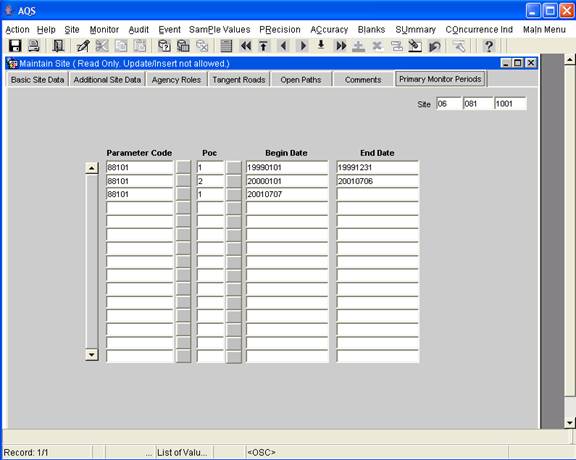
Figure 1: Primary Monitor Periods
- A new report, AMP355, to list the combined site sample values will be made available in a later AQS update. The report will display some additional summary information that is still being developed.
- Data initialization
- Default primary monitor periods have been created for all PM2.5 monitoring sites based on the monitor with the “most frequent” required collection frequency for any scheduled period of operation.
- Site-level daily values have been created for all PM2.5 monitoring days according to the default primary monitor periods and combination rules described above.
- A separate email will provide Excel files to assist in validating the default primary
monitor periods. Any required corrections will be made using Maintain Site. These corrections will update the combined site sample values.
Implementation of Core-Based Statistical Area (CBSA) and Combined Statistical Area (CSA)
The Office of Management and Budget (OMB) established new standards for Metropolitan and Micropolitan Statistical Areas. These definitions are being added to AQS because the older definitions (MSA and CMSA) will not be updated as populations change. The new standard created a CBSA as either Metropolitan or Micropolitan Statistical Area, and a CSA as a combination of CBSAs.
Although the CMSA is being replaced by CSA and the MSA by CBSA, the MSA and CMSA codes will remain in the database (ie, accessible through the “Objectives” tab) in case any analysis with the old codes is necessary. The ability to group by MSA (for the AMP410 report) will still be available as an option on the “Report Options” tab for backwards compatibility. Otherwise, the CMSA and MSA codes will not be supported by standard reports.
These new geographical areas are easily implemented because their boundaries follow county boundaries. The new CSA and CBSA codes will be derived from the county in which the site is located. Reference tables (in Excel format) containing the new CSA and CBSA codes are available on the AQS website.
Implementing the new codes impacted the following two processes:
I. Monitor Objective
Monitor Objective currently requires entry of urbanized area, MSA, or CMSA with each monitoring objective. The area used should be the one best represented by the monitoring objective. The MSA and CMSA codes will be replaced by CBSA and CSA codes.
These changes to the monitor objective include the following changes in load, correction, and maintenance processes:
- The AQS bar-delimited transaction format for Monitoring Objective Information, which is identified by a Transaction Type value of “ME”, has been modified to included CBSA Represented and CSA Represented fields.
- The AirQualitySubmission XML schema has been modified to include CBSA Represented and CSA Represented.
- Maintain Monitor allows the display, entry, and modification of CBSA Represented and CSA Represented values on the Monitor Objective tab. Figure 2 is an example of the new Maintain Monitor Objective Screen.
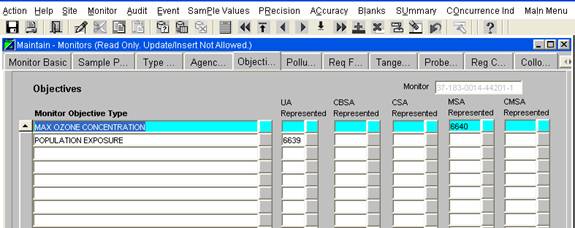
Figure 2: Maintain Monitor Objective
- Correct Monitor Objective allows the display, entry, and modification of CBSA Represented and CSA Represented information for Monitor Objective transactions.
- MSA Represented and CMSA Represented are maintained in the components above for backwards compatibility only: they may not be used for new transactions.
II. Standard Report Processing
The standard reports processing was modified to replace CMSA and MSA with CSA and CBSA. (Note: CBSA and CSA selects based on site location, not on what users have specified on the Monitor “Objective” tab.) Each specific part of the process is discussed below:
- The reports interface was modified to replace the selection on the Area Selection by removing MSA and CMSA and adding CBSA and CSA. Figure 3 is an example of the new selection screen.
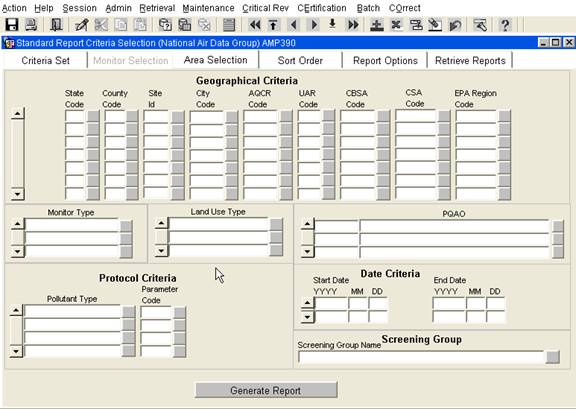
Figure 3: Area Selection Screen
- The Standard Report Cover Page which is the first page for all reports that displays the selection/sort criteria used now displays the CBSA or CSA criteria specified for a report.
- Several standard reports and/or work files were modified to replace MSA with CBSA and CMSA with CSA. The specific changes for each report include:
- AMP450 – Quick Look Report – Report and Workfile formats;
- AMP350 – Raw Data Reports – Workfile format;
- AMP460 – Raw Data Parameters by Time – Workfile format;
- AMP300 – Violation Day Count Report – Report and Workfile formats;
- AMP380 – Site Description Report – Report format;
- AMP390 – Monitor Description Report – Report format;
- AMP503 – Extract Site-Monitor Data – Workfile & XML formats;
- AMP025 – Screening Group Inventory – Workfile format.
- AMP410 (AQI Report) and AMP410S (AQI Summary Report)
- The AQI reports provide the ability to group by CBSA;
- The ability to group by MSA is maintained for backward compatibility;
- For the report formats, when the group by CBSA option is designated, the applicable CBSA is displayed in the header;
- For the AMP410 workfile format, when the group by CBSA option is designated, the applicable CBSA is displayed in each workfile record.
Miscellaneous Software Fixes
- The login form has been modified to again notify users 14 days before their password will expire. This capability previously existed but was omitted during an earlier modification.
- The Quick Look Report has been modified for CO and SO2. For both pollutants, multiple summary records are retrieved to create a single record in the report. For CO, 1-hr and 8-hr summary records are needed. For SO2, 1-hr, 3-hr, and 24-hr summary records are needed. Previously, if the 1-hr data was incomplete, at least one of the other records was not computed and the report omitted the incomplete single record. Now, the report will list the incomplete single record with a blank area for the missing summary data.
- “Maintain Monitor” has been corrected. Previously, when the Monitor Basic record (“parent” record) was updated (i.e., monitors were moved to production status), this did not propagate to all the subordinate (“child”) records. Now, the changes to the Monitor Basic record will be reflected in the subordinate records, and current status (i.e. “P”) will be displayed in reports.
- The Quick Look PM2.5 work file format has been modified so that the 98th percentile value for PM2.5 data are not truncated.
-----------------------------------------------------------------------------------------------------------------------------------------------------------
Chuck Isbell/RTP/USEPA/US
11/28/07 13:10
To: AQS Users 1, AQS Users 2
Subject AQS Software Upgrade Installed Today (11/28/07)
AQS User,
This email is to inform you that a software upgrade was installed this morning. The primary purpose of this upgrade was to correct the problem with report AMP460 (Raw Data Workfile Parameters by Time) and to make a new report AMP470 (Raw Values By Year) available for users.
The correction to AMP460 is adding back a capability that was inadvertently removed during an earlier upgrade. The program now creates a workfile that can have different formats based on the selection criteria with (1) a format listing multiple parameters sorted in site date time order with the multiple parameter values listed in individual columns and (2) a format listing single parameters for multiple monitors that is sorted by date time with the individual monitor IDs and data values listed in different columns. The second single parameter format has just been restored. This format makes it easy to compare sample values for the same date time easily for multiple sites for the same parameter to facilitate reviewing data for consistent concentrations.
The new report, AMP470 Raw Values By Year, only creates a workfile for raw data. This workfile was designed specifically to provide an easy method to create the input files for BenMAP. Since it was developed to meet an existing need, the specifics are as follows. The workfile contains a complete year of data and is comma delimited. The date is not in the file so the workfile naming convention needs to include the year. The sample values are always in standard units because the unit code is not included. Since the format is dependent on duration, limiting each file to only one duration is recommended. The only option is to include or omit data values flagged as exceptional events. The workfile contains a short header record and the format is documented in the help files for the system.
Please contact us if you have any questions.
Best regards,
Chuck
Chuck Isbell
National Air Data Group
OAR/OAQPS/OID (C339-04)
US EPA (919) 541-5448
-----------------------------------------------------------------------------------------------------------------------------------------------------------
Release Memo
Date: August 28, 2007
This release memo is to announce the availability of products related to the enhancements implemented on August 11, 2007 and to correct some resulting software bugs.
The products available related to the enhancements include:
1. New versions of the AQS Data Coding Manual and AQS Data Dictionary have been posted to the AQS TTN website: ttp://www.epa.gov/ttn/airs/airsaqs/manuals/manuals.htm
2. The AQS Oracle Discoverer business area "Sites V" has been updated to make available the following new site fields: standard horizontal datum, standard latitude, and standard longitude. These new fields can be added to previously saved criteria at any time.
3. The original release notes referenced a process to assist in populating the new standard horizontal datum, standard latitude, and standard longitude. This process "Procedure to Populate Standard Coordinates" was distributed to all users this morning via Jake Summers' email "Populating Site Standard Coordination Fields" (August 28, 2007 8:50 AM). The paper may also be found on the AQS webpage: http://www.epa.gov/ttn/airs/airsaqs/memos/memos.htm. (Note: the Discoverer query (site geo spatial.dis) that Jake mentioned in his memo is now available as a public query within AQS Discoverer.)
Software bug corrections:
1. Monitor remaining at status = "F" (Passed Field-level Edits) with no errors can now be changed to status = "P" (Production).
To perform this process, the monitor must be retrieved with Maintain Monitor, a field updated, and a save performed. A field must be updated even though the "Check Completeness" does not identify any errors because the form will not perform a save if nothing changed. Attached is a list of all monitors at status = "F". Any monitors created after the August 11, 2007 software enhancement may need to be processed to correct the problem ("F" to "P"), although data deficiencies may actually be the cause of the monitor being at status = "F". Several monitors, included in the attached list, were created in previous years and are still at Status = "F". These older monitors may just need to be deleted using Maintain Monitor.
2. Closing inactive monitors can now be easily done without error.
The enhancement, New PQAO Agency Role, created a new monitor agency role for all monitors active as of January 1, 2007. As a result of the enhancement, an error condition did occur if a user tried to close one of these monitors before January 1, 2007 and the error could not be corrected by the user. The Close Date on the Maintain Monitor, Monitor Basic tab must be used to enter the close date. There is now a Close Monitor process that looks at all monitor subordinate records that have a date and deletes any that have a date after the close date.
3. The AMP450 QuickLook workfile (coordinates were blank) and the AMP250 P&A Raw Data Report (not displaying the correct coordinates) have been fixed.
Part of the "Enhancement to the Site Registration Process" was to update reports to display the standard coordinate information. If the standard coordinates have been derived, they will be displayed for all reports. If the standard coordinates are missing, then both sets of the original coordinates (Lat/Long and UTM) will continue to be displayed. For any AMP450 QuickLook workfile created between 8/11/2007 and 8/28/2007, the coordinates were blank. In addition, AMP250 P&A Raw Data Report was not displaying the correct coordinates.
4. The AMP450 QuickLook Report (some were executing much too long and retrieving more records than expected) and the AMP240 P&A Reporting Organization Summary Report (retrieving more records than expected) have been corrected.
Several reports had a problem performing queries using primary quality assurance organization (PQAO). Some (e.g., AMP450), ran much too long but finally retrieved the correct data while others (AMP450 & AMP240) retrieved more records than expected.
5. The AMP430 Data Completeness Report has been corrected.
The AMP430 Data Completeness Report was not retrieving data when more that one sampling period was defined during the date range requested. The monitor was being reported as "Not Reporting" for the entire date range requested.
Release Memo
Date:
August 10, 2007
UPDATE August 28, 2007:
E-Mail Memo with procedure for populating geospatial info
An enhancement to the Air Quality System (AQS) was deployed on Saturday, August 11, 2007. This enhancement included: (1) an enhancement to the site registration process, (2) the implementation of the Primary Quality Assurance Organization (PQAO) that was enacted by the revisions to Part 58 Appendix A in October 2006, and (3) some minor fixes and enhancements to some AQS software. The Data Coding Manual and the Data Dictionary are being modified to reflect these changes and will posted during the week of August 13th on the AQS TTN webpage ( http://www.epa.gov/ttn/airs/airsaqs/manuals/).
Enhancement to the Site Registration Process
This enhancement is described in detail in the document “AQS Geospatial Doc” that was distributed to State/local/tribal agencies in March for comment. Minor comments were received and addressed as part of this implementation. The document described a plan that our office would follow to populate the standard latitude, standard longitude, and standard datum of WGS84. The process for doing this population has been changed to have it done by the agencies that own the sites and will be distributed to users after August 11. Below is a sample of the new layout of the “Maintain Site” form:
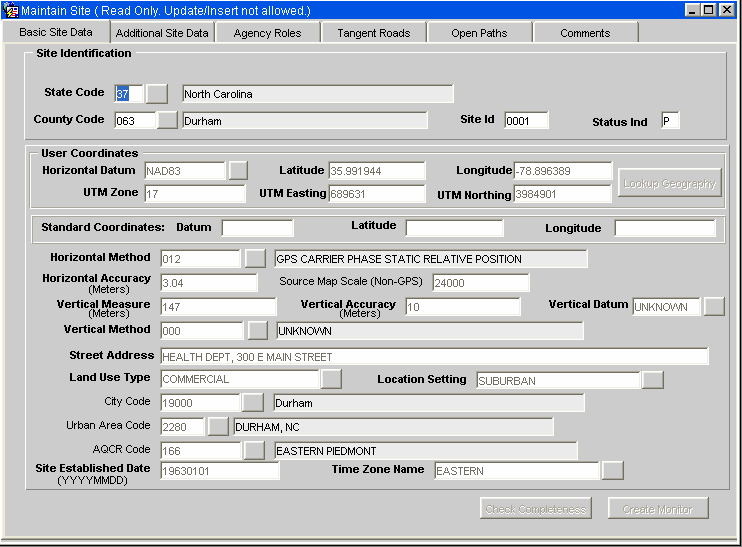
Specific changes to AQS components are as follows:
1. Maintain Site
a. The layout of the form has been changed to allow each code field, such as state code, to have a description field displayed with the meaning of the code.
b. The form now displays both “User Coordinates” (in either Latitude and Longitude or UTM) and the “Standard Coordinates” (in Latitude and Longitude with Horizontal Datum WGS84).
c. Lookup Geography: A new button is provided to look up geographical information from the EPA master geospatial database (Envirofacts), based on the location specified by the user. For registering a new site, after the user coordinates and horizontal datum are entered, clicking on “Lookup Geography” will result in a short pause (with the hour glass displayed) while the software derives the standard coordinates and also looks up: City, Urbanized Area, Census tract and block, Congressional District, and Zip code. Additionally, the location is verified to be in the state and county specified for the site. (In tribal mode, the state and county will also be looked up from the location.) Note: Fields that are looked up from the master database are set to read-only on the form and cannot be changed by the user. In order to change these fields, you must re-query the records and change the values. The standards coordinate values cannot be changed.
d. Check Completeness Button: A new button has been added to verify every field associated with the site and display all of the errors to the user at once. For a new site, after Lookup Geography has been executed and all required fields have been entered, “Check Completeness” will identify any problems that will prevent a record from being created. For site updates, errors will be reported for any new or changed fields, and warnings will be generated for any fields that are not being changed, but that do not meet the present business rules. Errors will prevent the changes from being saved, but warnings will not.
e. Windows popup help is used to display the meaning of any field on the form, rather than the meaning being displayed in the bottom of the window when the user clicks on the field. (This allows the meaning of a field to be displayed even if it is protected against entry.)
2. Batch Site Load Process
a. Load Site has been re-written to derive geographical information (the set of fields listed above) from the EPA master geospatial database.
b. All fields that can be derived are now optional. If any of these fields are supplied by the user, their value will be compared against the derived values and a warning will be produced if the values differ, but the insert or update will be allowed and written to the database.
c. When a Site insert or update transaction is submitted, all site fields are checked for compliance with the business rules, and all errors and/or warnings are provided for the user. If an error occurs on the transaction, all errors and warnings will be displayed in the Edit-Detail-Report. If only warnings occur, they will only be displayed in the job log emailed to the user.
d. Note: For updates, the above means that if an existing field for the site does not comply with the business rules, such as an inactive code, if that field is not changed by the update transaction, the update to other fields will be allowed, but the job log will contain the warning about the previously existing field. For example, if an update transaction is submitted that does not contain Vertical Datum, but the database contains a value of “Unknown” for the vertical datum, then the update will be processed but a warning message will be generated in the job log.
e. The validation routines have been modified to prevent the updating of “Support Agency” for the site through the batch process. In reality, this capability was never supported through the batch process. The load procedures would simply ignore the request. Now the user will receive a warning message that the Support role cannot be changed through the batch process.
To further simplify the selection of the “Horizontal Collection Method” for data input, duplicative codes have been changed to inactive. The original code set included very specific codes beginning with “0” which many users had difficulty in knowing which to select and general codes beginning with “1” to define a general category that includes each specific code category. The specific codes have been made inactive.
An example of this is that codes “001” to “007” specified “Address matching” with different specific procedures while “101” is the general “Address Matching”
New PQAO (Primary Quality Assurance Organization) Agency Role
1. All monitors that were in operation as of January 1, 2007 or later must have a PQAO role assigned. PQAO assignments are not allowed before January 1, 2007.
2. Criteria monitors are no longer required to have a Reporting Organization role assigned (although they will still be allowed). However, for maintenance purposes, all criteria monitors must have a reporting organization defined through December 31, 2006. Reporting Organization roles can still be assigned for any monitor. The only difference now is that it is no longer required for the criteria monitors.
3. All existing monitors in the database now have a PQAO role assigned. The agency code assigned to a monitor is based on the first rule that applies:
a. If an agency has requested to be “combined” with another agency, the new combined agency code is used.
b. Use the Reporting agency role assignment, if it was previously assigned.
c. Use the unique Reporting agency used at the site if there was only one assigned by the screening group.
d. If none of the above conditions apply, assign an agency code of “9999” (Interim PQAO Agency). Once converted, lists of these monitors will be created and distributed to users for corrections.
4. Precision and Accuracy Summaries.
a. Precision and accuracy summaries of any type are no longer computed for data with dates after December 31, 2006. (But monitor and Reporting Organization summaries will continue to be computed for data with precision and/or accuracy dates prior to January 1, 2007)
b. For time periods after January 1, 2007, Precision and Accuracy summaries are only available with the AMP255 – P&A Quality Indicator Summary report.
5. Load and Maintain Monitor
a. Both Load and Maintain Monitor now support the assignment of PQAO agency roles.
b. The Monitor completeness rules will require a PQAO role to be assigned for all monitors before they are relationally complete and set to production status. (i.e. before raw data can be loaded.)
6. Standard Reports
a. All references to “Reporting Organization” (and its abbreviations such as “RO”) have been replaced with PQAO. This includes both labels on the Standard Report form (R31) and the labels on the reports themselves.
b. All queries by PQAO will use monitor reporting agency assignments for time periods before January 1, 2007 and PQAO assignments starting January 1, 2007.
Minor Fixes/Enhancements
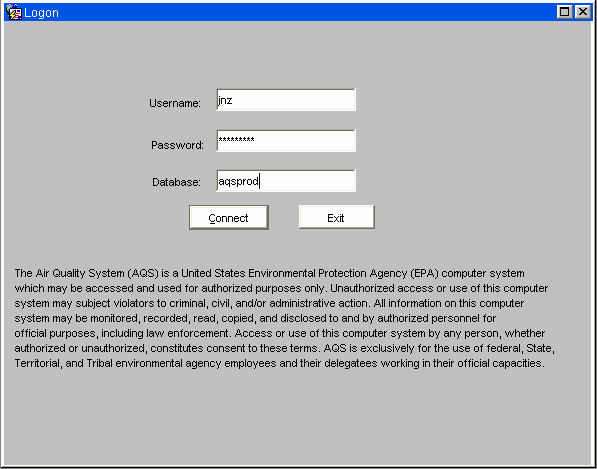
1. Login Form has several changes/improvements:
a. The login form now displays the required EPA security warning. (This will allow users to bookmark the URL and go directly there without going to a separate security warning page first.)
b. The login form now has a default database ID so users do not have to type it in every time.
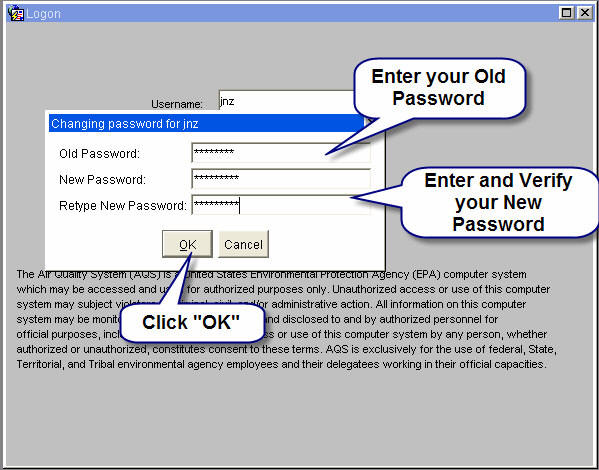
c. The login form now detects if a user’s password has expired and will allow the user to update their own password rather than having to call user support. Once your password has expired, you will see this screen:
2. AMP450 – Quick Look: The report format for PM10 has been modified to increase the size of the field “Est_Days_GT_Std” to allow the display of larger numbers.
3. AMP430 – Data Completeness Report: The report was enhanced to support new monitor type, “SUPPLMNTL SPECIATION”. The report was failing because the monitor type title was the maximum defined length which caused a problem.
Release Memo
Date:
May 24, 2007
This memo is being sent to provide the release notes for the AQS upgrades installed this past Monday morning May 21, 2007. The install occurred between the hours of 7:00 AM and 9:00 AM EST.
1. Duration X (24 hour) NAAQS Averages will now be computed for the new parameter codes 88500, 88501, 88502, and 88503. Daily summaries and AQI will be computed for 88502.
2. Required collection frequency code '7' (for every 12th day) was not being allowed for PM2.5. The software has been changed to allow this RCF for PM 2.5.
3. The test for Maximum Accuracy Percent Difference, performed whenever accuracy data is inserted or updated, was not using the correct field from the Parameters table. This has been fixed.
4. The AMP460 Standard Report (Raw Data Parameter by time workfile) now has the option to include Blanks Data (Lab, Field, and Trip).
5. This update will allow the AQS data extract reports (AMP500. 501, 502, and 503) to generate XML output documents in the new Version 2 of AQS XML Submission Schema.
In addition to the release notes, please note the following two items:
1) The data correction that is required to update (a) the old Duration X (24 hour) NAAQS averages, (b) the daily summaries, and (c) the AQI as a result of the software enhancement (described in item #1 of the Release Notes) will be completed next week.
2) As a result of the software upgrade last Monday, a new bug was introduced within Maintain Monitor. Errors are now being produced on the Required Frequency field when creating a new monitor using the Duplicate Monitor. Actually, a number of pop-up error windows are generated. The good news is....... after one closes out all the error message windows and deletes the Required Frequency Record (using the Remove Record icon in the tool bar), the new monitor may be saved. This new bug is being addressed and should be resolved in the near future.
Release Memo
Date: February 14, 2007
This email is to update you on the status of the recent retrieval problems and what has been done to upgrade the AQS report server to enhance throughput and prevent future problems.
Problems with the reports & retrievals have persisted since the EPA National Computer Center (NCC) upgraded our AQS Oracle Application Server to OAS 10g Release 2 (10.1.2.0.2). Some of the reported problems have been as follows: (1) taking too long for reports to begin execution, (2) taking longer than normal for reports to complete execution, (3) reports hanging up and not completing once the job is running, (4) reports generating large work files not completing, and (5) not being able to cancel report jobs in execution.
To address these problems, the AQS reports/retrievals environment was enhanced this past weekend (February 10 - 11, 2007) utilizing a new feature of Oracle's OAS 10g Release 2 called Report Engines. The Report Engines feature provides the technology to have multiple execution queues and the ability to control the number of concurrently executing report jobs within each of those queues (e.g., the ability to tune the throughput and efficiency of reports & retrievals).
Separate report servers were installed for AQS. One server for on-line reports and the other for batch reports (destined to Email or CDX). On-line reports include standard reports with "Run Online" selected, as well as reports run from the Batch Process screen (Edit/Load Summary, Scan Report, etc), are intended to be short reports to be run while the user waits; whereas batch reports are intended for large reports that will require significant processing time. The on-line report server will support up to six reports at the same time; if more than six are submitted, the reports are queued on a first-come-first-served basis. The batch reports server will execute up to four reports at the same time and will queue any above that number. If a report has been queued, its status will be "Awaiting Execution." Jobs may be cancelled at any time by the user via the cancel button on the reports progress bar, or the cancel button on the "Retrieve Reports" form.
Please note... the problem identified last week with the AMP450 Quick Look has not been resolved. The AMP450 is not completing execution when generating a large work file, such as a national retrieval.
Release Memo
Date: November 3, 2006
This memo is being sent to provide the release notes for the AQS upgrades being done Friday morning November 3, 2006. AQS will be taken off-line at 2:30 AM Eastern Time, to perform a database backup prior to the software installation. The install will occur between the hours of 6:00 AM and 12:00 noon ET.
1. Load Raw Data Redesign
This is the primary update in this deployment and is a re-design to the process of loading raw measurement transactions (Types RB, RC, and RD). This implementation of the Load Raw Data redesign completes the move of AQS software to the new servers at the National Computer Center (NCC), which began in the spring of 2005. Because of the NCC requirement to shift to the new hardware, the load process has been reengineered to execute on the database server, as opposed to an application server. This change will have minimal visibility to the user community, but a significant performance improvement is expected for batch load jobs that do not have errors. Another improvement includes a logic change so when a monitor or protocol is not registered, only the first record will be listed with the appropriate error.
In addition, with this redesign, “LAB” blanks will be supported by the application (in addition to types TRIP and FIELD),
The User Coding Manual will be updated to reflect the new blanks type "LAB".
2. New Interface for Batch Job Submissions
The previous interface for submitting batch jobs and reports was changed to use a web service to correct a security issue. The only change that should be visible to users is in the email sent to the users when a batch job completes (i.e., emails will be from “Oracle User <oracle@quarter.rtpnc.epa.gov>“).
3. The following software modifications were made to correct bugs reported by users:
A. The following three fixes were made to the Standard Reports User Interface (R31) Screens:
a. Form now recognizing Tribal Mode menu selection. Once again, users will have the ability, as documented in the AQS Retrievals Manual, to turn on and off Tribal Mode from within their session (via the drop-down Action Menu). If turned on, then the Standard Reports User Interface (R31) screens will display "Tribal Mode" in the screen label and display the Tribal Code column in addition to the State and County columns.
b. Label overlap was corrected on Standard Reports User Interface (R31) Screens. This mod corrects some of the screen labels where they were overlaying other labels. For example, the Geographical Criteria label on the Area Criteria selection screen was overlaying the column headings for City and AQCR Code.
c. Reports that terminated with error can now be deleted by the submitter. This fix enables the user to delete report jobs listed on the Retrieve Reports screen that had not completed normally.B. Label Overlap on the POST Form was removed for the “Critical Review Raw Data” and “Comparison Date” and “Error Description”. This mod corrects the screen label overlays that were occurring on the POST form.
4. Latitude/Longitude Conversion to UTM
This change only affects site inserts and updates. During the last AQS conference, a user identified a problem with this conversion process. The conversion between Latitude/Longitude and UTM was found to be correct (to a high degree of precision) only for the Horizontal Datum, NAD27. With this change, UTM coordinates will only be accepted with a Horizontal Datum of NAD27, and Latitude and Longitude coordinates will only be converted to UTM for NAD27. For all other Horizontal Datums, inputs in UTM coordinates will be rejected, and inputs in Latitude/Longitude coordinates will not be converted to UTM (i.e. the Site UTM coordinates will be null).
This is an interim change to eliminate the creation of incorrect UTM coordinates. A permanent solution for Lat/Long/UTM conversions will be implemented in the March/April 2007 timeframe. This conversion process will be implemented using a geospatial process using a database operated by the EPA Office of Environmental Information. Additional information and instructions for correcting existing UTM (non NAD27) coordinates will be provided in 2007.
5. Monitor Last Sampling Date
Previously, when all of the Raw Data for a monitor was deleted, its Last Sampling_Date was incorrectly set to January 1, 1957. With this software enhancement, it will be set to null.
Addendum (additions) to the original Release Notes (November 8, 2006):
1. The Release Notes (item #1 - Load Raw Data Redesign):
a. As a result of the redesign the Edit/Load Summary Report, that is generated from the Load File and Submit Correct Data functions, now shows the counts for all transaction types, not just the transaction types that were submitted via the Load (i.e., the summary shows zeros for those transaction types not present in the Load). This is a known issue and the Edit/Load Summary Report will be modified to only report summaries for those transaction types present in the Load.
b. Users will now see a pop-up window with an informational message saying, "Your Job was successfully submitted". This pop-up is displayed after clicking on any of the eight batch load processes or reports located on the Batch Process Screen (i.e., Load File, Submit Correct Data, Edit/Load Summary, Edit Error Details, Scan Report, etc.).
c. A new Session Status = "WARNING" was added to the Batch Process Screen. The user can cross-reference the Session Status (i.e., ACTIVE, COMPLETED, ERROR, WARNING) located on the Batch Process Screen with the email message created by either the Load File or Submit Correct Data functions. If the Session Status = "WARNING", then there were no errors but the email message created by the either the Load File or Submit Correct Data functions will contain some warning messages. Also, if the user looks at the email message and sees "No errors" or at the Session Status = COMPLETED, then the load was successful.
d. Emails generated by the batch load processes will no longer be from “JRUN daemon owner <jdaemon@darter.rtpnc.epa.gov>". Emails will now be sent from “Oracle User <oracle@quarter.rtpnc.epa.gov>“.
2. The Release Notes (item #2 - Batch Job Submissions Update)
The body of the emails, from the Load (Oracle User <oracle@quarter.rtpnc.epa.gov>), will no longer contain the errors for transaction types RB, RC, and RD, but will continue to carry the other transaction types. Users are encouraged to use the Edit Error Detail Report, rather than the email log, for the complete list of errors. In addition, errors for "all" the transaction types will still be in the message body for the output from the Submit Correct Data.
3. Another important benefit of this software install is to reduce, and hopefully eliminate, the problem of the "Load Jobs Remaining ACTIVE". If you observe this problem, where your Load job has completed processing but has remained in "Active" Status, please report the problem to the EPA Call Center at 1-866-411-4372. This will give us an opportunity to investigate the problem prior to the job status being reset allowing you to continue with batch processing.
Release Memo
Date: May 1, 2006
This memo is being sent to document the AQS software changes that were installed early this morning (Monday, May 1). Please review the following to ensure that you are aware of the software changes. Please contact the AQS Helpdesk via the EPA Call Center (1-866-411-4372) if you have questions, concerns, or discover problems resulting from the new software upgrade.
P & A Quality Indicator Summary (AMP255):
-
Monitors that had a monitor type of NAMS/SLAMS/PAMS and a monitor type of “Other” defined for the reporting period will no longer show up on both the NSP and Other report spreadsheet pages. These monitors will only be contained within the NSP spreadsheet.
-
The Autofilter Excel macros will now work on the Ozone spreadsheet pages.
Quick Look Report (AMP450 / AMP450C):
-
The City Name field on the report will no longer allow long names to wrap to the next line and overwrite the Units field. The city name will wrap to the next line if necessary to display the full name, but subsequent lines will be pushed down instead of being overwritten.
-
Long Agency names, which are displayed at the end of the report, will no longer be truncated (e.g., the Agency Name field length on the AMP450 report has been expanded to match the size of the internal database length), but will span as many lines as necessary.
Reports User Interface Form (R31):
-
When changing the output from a report to a work file, the “Print Format” selector box will no longer be displayed on the screen.
Accuracy Report, Raw Data Report, and Violation Day Count Report:
-
Large numbers that would not fit in a 10 character print format have been causing the reports to fail with an error. The field size has been expanded to prevent overflows.
Maintain Raw Data Form:
-
The form will no longer be generating an error whenever a user enters a comment for a Qualifier.
Data Completeness Report (AMP430):
-
For a work file, counts are displayed by months. For months where there was no reported data, the work file had null values (back to back comas) for the Number of Observations and Percent Completeness fields. It now loads zeros into these fields.
Raw Data Post to Production:
-
The POST will no longer fail for raw data for collocated monitors when the durations are different (e.g. one was duration 1 and the other was duration 7).
Load Precision and Maintain Precision:
-
When data for Flow Audits were processed, an incorrect business rule was being enforced -- the Actual and Indicated values were being compared to the Max_Pecision_Check_Value for the parameter, causing the load to fail because the flow values could not be converted to the standard units for the parameter. This rule is no longer being enforced for Flow Audits.
Load Precision:
-
The load will no longer fail when an FRM Audit is loaded for a date when both Raw data and Blanks data are present.
Automatic Precision Generation:
-
The rules for when to automatically generate precision data were changed. Previously, a new precision record would not have been generated for a specific date if a precision record already existed that was linked to both the primary and secondary monitor (i.e. the precision data input transaction had a collocated POC specified). This has been changed so that a new precision record will not be generated for a specific date if a precision record already exists for the Primary monitor. Caveat: This means that if there are multiple collocations at a site, then precision records will be automatically generated only for the first collocated monitor loading raw data on that date. This change was made because users had been loading collocated precision data without specifying the collocated POC, and duplicate records were generated by the Automatic Precision facilities because the existing records did not link to both the primary and duplicate monitors. Please note: the duplicate records have not been deleted from AQS. These deletes will be processed later. An additional user notification will be distributed on that issue.
Maintain Raw Data:
-
If a form error occurred while processing a user’s changes, then after the message was cleared, the user could save the changes directly to production raw data (i.e., without processing the transactions thru Stats CR). To resolve this, the database was changed to disallow direct changes to production raw data via maintain.
Text File Outputs:
-
The "text", "rtf", and "html" output formats are now working for the AQS standard reports.
Release Notes
Date: March 4, 2006
On Saturday, March 4, 2006, the EPA National Computer Center (NCC) moved the AQS web application forms to a new Oracle 10g server. The "old" URL link on the Warning Notice webpage has been updated with the new URL. Users click on the link "I agree to these terms and want to enter the AQS application".
The upgrade to the new 10g Oracle environment requires the latest JInitiator (version 1.3.1.18) and connections outside the EPA firewall (i.e., you use "https" for Secure Sockets Layer), a new Verisign security certificate. The procedures for doing this are found on our AQS Web Initial Setup page ( http://www.epa.gov/ttn/airs/airsaqs/aqsweb/aqswebsetup.htm). Existing users will need to perform steps 1 & 2 on the Initial Setup page.
Release Memo
Date: February 16, 2006
Subject: AQS Software Deployment and Outage (Feb. 24, 2006)
An AQS upgrade is planned for Friday, February, 24, 2006. This enhancement will provide the capability to automatically generate the collocated precision audits from reported collocated Raw Data. To support this software upgrade, the system will be taken offline at 4:00 AM Eastern Time, and is expected to return to production status by 12:00 noon ET on Feb. 24. The AQS system will be unavailable to users during this time.
Background:
For collocated PM2.5
monitors, EPA's data reporting requirements specify submittal of raw
data values from both monitors, as well as submittal of precision
audit data (comparison of both monitors' results for the same
sampling event). So the same sample values are used twice... once as
the sample value on the raw data record for each monitor, and once
as either the actual or indicated value on the precision record for
the pair of collocated monitors.
Because of the duplication of effort in submitting the same values twice on 2 different transactions, many of the AQS users have asked for an enhancement that would automatically generate the precision data records from the raw data records for collocated monitors. The AQS team has completed this enhancement, and is making it available in the production environment.
The specific changes planned for February 24 are as follows:
1. This upgrade provides the capability to automatically generate the collocated precision audits from reported collocated Raw Data where the primary monitor and collocated monitors are both reporting duration 7 (daily data), and the precision audit records do not already exist, (for any parameter, not just PM2.5). This upgrade will eliminate the need to report this collocated data as both raw data and precision data. (Note: Only raw data in the date range specified by the collocation date range will be used to generate precision audits.) So this enhancement will automatically generate precision records when the following conditions apply:
a. Monitors must be designated as collocated via a monitor collocation record in the database.
b. Duration of sampling for both monitors' raw data must be "7" (24 hour avg).
c. The raw data sampling date must fall within the monitor collocation period date range.
d. No precision record exists (for the primary monitor's raw data date).
Also, please note that if you do not want AQS to system generate precision data records, then do not create the monitor collocation records.
2. After the upgrade, whenever a new monitor collocation is defined, Precision Audits will be automatically created for all collocated production raw data posted and the precision audits do not already exist.
3. After the upgrade, Precision Audits will be automatically created whenever collocated raw data is posted for both the primary and collocated monitor, and the raw data is in the date range of the collocation period. The automatically created precision records must pass the load checks currently done for precision transactions; so records will not be created when these tests fail. An example of a failed load check would be the percent difference check between individual primary and collocated sample values. Whenever a load check fails, a message will appear in the post report, but the specific pair of collocated values will not be identified.
Notes:
1. Continuous collocated precision audits are unaffected by this change -- they will not be automatically generated. I.e. if the primary monitor is continuous, and collecting hourly data, and the collocated monitor is intermittent, with a duration of 7, then the user must manually submit precision audits with a duration of X for the precision audit to be loaded into the database.
2. Before the upgrade, users who want to ensure that their precision audits are created by the new process should ensure that their Monitor Collocation periods are created before February 24, and that the collocation time periods start with their earliest collocated raw data.
3. After the upgrade, if a new Monitor Collocation period is created by either the Maintain Monitor form or the Batch MJ transaction, the precision audits and their associated summaries will be created. If the collocation period is for a long time interval, and thus contains many collocated raw data pairs, then the creation of the precision audits may take a significant amount of time. It is therefore recommended that users submit MJ batch transactions when there is a large amount of collocated raw data to be processed.
4. The upgrade will begin at 4:00 AM Eastern Time, on February 24, 2006, and is expected to be complete by 12:00 noon Eastern time on Feb. 24. The AQS system will be unavailable to users during this time. Please note: On Thursday evening (Feb. 23), we request that users only submit batch jobs that will complete execution prior to AQS being taken offline for the upgrade at 4:00 AM ET (Feb. 24).
5. Concurrent with the AQS upgrade, the EPA National Computer Center will upgrade the AQS database from Oracle Version 9i to Version 10g. This change should be completely transparent to users.
Issues Resolved with this Release
1. Maintain Precision Form: The following issues are resolved with the maintain precision form with this release.
a. Collocated Precision problem (Remedy Ticket 237082)): The form was reporting that it could not find the collocated raw data associated with the precision record.
b. Deletion Problem (Remedy Ticket 234206): A user was receiving the error "Global_Scale2 does not exist" when trying to delete a gaseous precision record.
c. FRM/PEP Browsing Problem: When a user retrieved a set of FRM data, the message "Do you want to save" was displayed for every record, even though no changes had been made.
d. Context sensitive help is now available for all user-accessible fields.
e. Multi-user-access: Previously if multiple users attempted to access the same precision record at the same time, the form would hang for the second and subsequent users until the first user exited the form.
2. Load Precision:
a. FRM/PEP Precision Load Problem: The load program was reporting that the State Sample did not exist, when in fact it did, when there was Blanks data loaded for the same day.
b. The Last_Sampling_Date for monitors was being updated when precision data was loaded. (It should be updated only when Raw Data is loaded/posted.)
3. Post:
a. The Monitor Last_Sampling_Date was not being decreased when Raw Data was deleted.
Release Notes
Date: December 15, 2005
Enhancements and Fixes
-
Reports User Interface:
a) The restriction that the selection criteria End Date must be earlier than the present date has been dropped, in order to allow reports that select by Quarters to include the current quarter. -
Maintain Accuracy:
a) Fixed error with deleting Accuracy audits;
b) Fixed error displayed for the Units Code when user retrieves Flow Audits. -
Critical Review Raw Data Report:
a) Fixed problem with report retrieving data with modification dates outside of user's selected date range. -
AMP260 -- Reduced Frequency Distribution Report:
a) Fixed problem where report was not doing page breaks when the State changed. -
Edit Detail Report and Edit Summary Report:
a) Fixed error causing reports to crash for long screening group names. -
Maintain Monitor:
a) Agency begin date is required but was not being displayed as bold text;
b) Added an error message for the specific data (raw, blanks, accuracy, or precision) when Sampling Period End Date occurs outside the date range;
c) For Sample Periods tab: Data now sorts by Begin Date;
d) For the Agency Roles tab: Records are sorted first by Agency Role, then Agency Code, and then Begin Date;
e) Fixed problem with the insert record ('+') icon;
f) Fixed problem with duplicating monitors. -
Batch Submit Form:
a) For User Support personnel, the form was not displaying selected user's data. -
Correct Monitor Type:
a) Fixed prompt displayed when user deletes a row. -
Precision Report:
a) Fixed problem causing report to fail with "Numeric Value" error. -
AMP240 -- P & A Reporting Organization Summary Report:
a) Fixed problem with queries by Reporting Organization.
New Report: AMP255 - Precision and Accuracy Criteria Pollutant Quality Indicator Summary Data Extraction
The new P/A Quality Indicator Summary report has been operating in the production environment for almost 3 months. It provides statistical estimates of the precision, bias, and accuracy of monitors for Criteria Pollutants, and it also summarizes the completeness of precision and accuracy monitor checks. This information is presented as a set of Microsoft Excel spreadsheets, where there is one spreadsheet per criteria pollutant and type of data.
The new P/A Quality Indicator Summary report is accessed as Standard Report number AMP255. Using this form, the user can select geographical areas or monitors to use for selecting data, specific pollutants, monitor types, reporting organizations, and a date range of data to extract. The outputs will be delivered either on-line via the AQS form or via CDX. Outputs are delivered to the user as a zip file with the following components. A PDF cover page showing the users report criteria; a set of coma delimited text files that contain the extracted data, an Excel Workbook file that will automatically read the data files, and a README.txt file that identifies the content of all of the data files.
Detailed instructions about how to use the new report, and the content of the data files, are contained in the on-line help within the AQS web application. Just go into on-line help and search the index for "P & A Quality Indicator Summary Data Extraction Report".
Release Notes
Date: July 18, 2005
Enhancements
1. Monitor Close Date: A new field called “Close Date” has been added to the Monitors record. Users can now close a monitor simply by entering an end date in the new Close Date field, either on a batch transaction or in Maintain monitor. The close date will automatically be used to close open date ranges for sampling periods, monitor type assignments, agency roles, and required collection frequencies, as needed. Re-opening a monitor will still require supplying all date ranges individually as well as removing the close date on the monitor record.
2. Critical Review Reports: The Critical Review Reports {Critical Review Raw Data, Critical Review Monitor Changes, Critical Review Site Changes, Critical Review Precision and Accuracy Monitors, Critical Review Precision and Accuracy Reporting Organizations, and Critical Review Precision and Accuracy Single Checks} have all been enhanced both to allow data selection by Tribal codes and to allow data display/reporting by Tribal codes. The reports are now created by the Retrieval, Standard Report Selection Process (R31) rather than from Critical Review Menu.
3. Maintain Security: Since the migration to the new hardware (Suffolk), AQS no longer requires a Unix user id/password. Therefore, the Unix password synchronization has been removed from the “Administration – Application Security” form.
Problems Resolved
1. Overlapping Sampling Periods: There was a bug in the database that allowed duplicate or overlapping Monitor Sampling Periods to be created. All duplicates have been removed, and all users with overlapping sampling periods have been notified.
2. Frequency Distribution Report (AMP230) Problem: The program was not handling multiple durations correctly (for example, duration 1 & W for ozone). Rather than creating 2 lines of data, all lines were labeled as duration W and the percentiles numbers and values were repeated in the space available, and some percentiles were omitted completely.
3. Quick Look (AMP450) All Parameters Report Problem: When multiple methods have been used in a Monitor-Year, the report displayed the first method used rather than “Multiple Methods”.
4. Update problems with user profile: The mechanism that creates history records for changes in a user’s profile was creating duplicates, that prevented a user from being activated (status “P”) or inactivated (status “I”). This has been fixed.
5. Maintain Monitor Collocations Problem: The form has been enhanced to allow changes to be made to a collocation period, such as adding a collocation end date.
6. Correct Forms Exclusion Date: If a user used the global search and replace on a Correct form to set the Exclusion flag, and then attempted to save the data, the system would generate an error for every row saying that the Exclusion Date is required. This has been fixed by changing the database triggers to automatically fill in this date.
7. Maintain Accuracy Units: If the user selected an Audit Class of FLOW the form would allow the user to pick a non-flow unit; an error was generated when the user saved the data, but they should not have been able to pick the non-flow unit.
Release Notes
Date: May 11, 2005
The following two software changes have been implemented in AQS:
1) Reports that you choose to be delivered via Email (as opposed to CDX), are now being sent by the user "Internet Deamon Owner" instead of Report_User.
2) Batch Load job logs are now being emailed by the user "Oracle Database Owner" instead of the end user.
Release Notes
Date: March 25, 2005
Load Precision
1. Collocated and PEP (Performance Evaluation Program) precision data with a corresponding Raw Data measurement were interpreting null values as zero. The software has been enhanced to reject the Precision data.
2. Previously the Precision Scale was always the scale (number of digits after the decimal point) of the Actual Value on the input transaction. It has been modified to be the larger of the Actual and Indicated value scales. All existing Precision and Accuracy data will be corrected to reflect this change.
3. AQS was generating a truncated error message, "ORA-204", if precision or accuracy data transactions were loaded for a monitor that was not in the database. This has been fixed to generate a meaningful error, "Monitor ID (State, County, Site, Parameter, POC) not in database".
Load Accuracy
Previously the Accuracy Audit Scale was always the scale (number of digits after the decimal point) of the Actual Value on the input transaction. It has been modified to be the larger of the Actual and Indicated value scales. All existing Precision and Accuracy data will be corrected to reflect this change.
Maintain Precision
Previously the Precision Scale was always the scale (number of digits after the decimal point) of the Actual Value on the input transaction. It has been modified to be the larger of the Actual and Indicated value scales. All existing Precision and Accuracy data will be corrected to reflect this change.
Maintain Accuracy
1. Previously the Accuracy Audit Scale was always the scale (number of digits after the decimal point) of the Actual Value on the input transaction. It has been modified to be the larger of the Actual and Indicated value scales. All existing Precision and Accuracy data will be corrected to reflect this change.
2. The Maintain Accuracy Form was not calling the Reporting Organization summary procedure whenever a value changes; as a result, the values on the Reporting Organization Summary Report (AMP240) would not reflect changes made with the form. The Maintain Accuracy Form has been fixed, and a correction script is being run against the AQS accuracy data to compute the missing values. The three most recent years (2003 - 2005) will be updated this weekend, and earlier years will be corrected in the near future as computer resources become available.
Batch Submit Form
When the Batch Submit form was accessed by a user support staff member, it reported an error on startup and would not allow the Raw Data Inventory report to be run. This has been fixed.
Maintain Certification
Form has been enhanced to allow both Concurrence and Non-Concurrence of monitor certification.
Violation Day Count Report (AMP300)
The report was summarizing data by County instead of by State. This has been fixed.
Maintain Raw Data
The form was reporting an error when changing a pre-production null code to a sample value. This has been fixed.
Browse Parameter Form
The EPA Chemical Identifier was displayed as gray text on a gray background. This has been fixed to be gray text on a white background (standard for read-only data).
Browse Sampling Methodology
The form has been enhanced to show units description in the units column list of values.
Release Notes
Date: February 25, 2005
1. The Time Zone field for sites is now mandatory -- It is now required whenever sites are inserted or updated. The Maintain Site form was updated to move this field from the "Optional" list to the "Required" list. All existing sites without a Time Zone have been updated by a script to populate this field.
2. The Edit Error Detail report was fixed so it contains relational errors after running a Submit Correct Data job.
3. A new report was added to the "Standard Retrievals" list. The Screening Group Inventory Report (AMP025) allows users to obtain information about the contents of their screening group. The formatted report produces a count of the number of each transaction type and action. The workfile version will produce a file containing the transactions in the various staging tables. Please note: You must have selected a screening group in the session in order to see this report appear on the list of available reports.
Release Notes
Date: January 27, 2005
Tribal Enhancements
The primary enhancement is the support of Native American Tribal data. AQS now allows data to be entered and queried by either the combination {State, County, Site_ID} or by {Tribal_Code, Site_ID}. The intent is that either method of referencing a site is equally valid for all of the user interface to AQS. To this end, a Tribal Code field has been added to the Site definition in the AQS database. Whenever this new Tribal Code field is filled in, the site can be accessed via either method. For new sites, the State and County of the site are considered to be just geographical characteristics of the site, that are determined by its latitude and longitude. When a new site is created using the Tribal Code and Site-ID, its geographical state and county are looked up in the EnviroFacts GIS database by its latitude and longitude, and when a new site is created using State Code and County Code its latitude and longitude is verified to be in the boundaries of the State and County in the GIS database.
The following are the specific changes to support this capability:
Tribal Mode
The user interface forms for AQS have been updated to operate in either "Tribal Mode" or "non-Tribal Mode". In Tribal Mode, a Tribal Code can be used for creating or retrieving data for a site, while in non-Tribal Mode, the State Code and County Code are used. The user can switch back and forth between modes by using the "Tribal Mode On" and "Tribal Mode Off" menu pick available from the "Action" menu at the top of the screen. Note: When a user changes mode, the form they are using is reloaded – i.e. a blank form will be loaded in query mode.
The mode that the user starts in when they log in to AQS is set by the "Tribal User" flag on the user’s profile. To change this flag, use the "Admin" menu "Security" pick to display the user’s profile. Then check or un-check the Tribal User flag and click the save icon. The user’s mode is immediately changed, and the next time the user logs in, they will start in the selected mode.
Please note: When a user is operating in Tribal Mode, they can query data by Tribal Code and Site-ID; however, the State and County code columns are still displayed. This is done to allow Tribes that overlap multiple states and counties to retrieve just their data in a particular state or county if desired.
AQS LOAD Process
To load tribal data into AQS, the AQS batch input
transactions can be used. All of these transactions have been
enhanced as follows: The "State Code" field is now "State Code or
Tribal Indicator" and the "County Code" field is now "County or
Tribal Code" (See the new transaction layout definitions at
http://www.epa.gov/ttn/airs/airsaqs/manuals/AQS Input Transaction
Formats.pdf.)
To create, update, or delete data for a Tribal Site (including creating the site itself), the user should enter ‘TT’ in the "State Code or Tribal Indicator" field and the Tribal Code in the "County or Tribal Code". This is true for all AQS transaction types.
Note: Since either combination {Tribal Code, Site ID} or {State Code, County Code, Site ID} can be used to specify a particular site, both must be unique in the database. I.e. if a Tribal user wants to create a site with Site_ID = ‘XXXX’ that is geographically located in a state-county that already has a site with Site_ID=’XXXX’ then it will be rejected as a duplicate, and if a non-Tribal user attempts to create a site with Site-ID=’YYYY’ in a State and County where a tribal user has already created site ‘YYYY’ then it will be rejected as a duplicate.
Please note also: Since Tribal Code is part of a unique identifier for a site, it is not possible using the AQS Load Process to update an existing site with a tribal code, or to change the tribal code of an existing site; these can only be accomplished via the Maintain Site form.
Correct Forms
The "Correct" forms are used to fix errors that are reported when loading AQS input transactions. They display the data for the user’s screening group exactly as it is entered on the transaction, with errors reported for any relevant fields. This means that if the user is operating in Tribal Mode, the first two columns will be labeled "Tribal Ind." and "Tribal Code" while if the user is not in Tribal Mode, they will be labeled "State Code" and "County Code". Note: in either case, the data will be displayed as it was entered on the transaction; i.e. if the user entered State and County codes on the transaction, they will see that data in the first two columns regardless of the mode, and if they entered "TT" and a Tribal Code, they will see that regardless of the mode.
If the user is in Tribal Mode, and using the Correct Site form to create a site, when the user enters that Latitude and Longitude fields, the location will be used to determine the set of valid codes that can be selected for the other geographical fields such as City Code, UA Code, and etc. If the user does not enter the Latitude and Longitude before entering these other fields, then the List of Values ("Drop Downs") will be empty – i.e. the user can type anything in the field but cannot select from the list.
Maintain Forms
The Maintain Forms are used to edit (update) existing data or create small numbers of new data elements. The maintain forms have been modified so that if the user is in Tribal Mode, a Tribal Code field is displayed for entering or retrieving data. When not in Tribal Mode, this field is hidden. Otherwise, the Maintain Forms behave exactly as previously.
Note: As stated above, in the section about the AQS Load Process, existing sites can be converted to Tribal Sites by using the Maintain Site form to assign a Tribal Code to a site.
Standard Reports
The AQS standard reports user interface has been enhanced in the following ways:
- Data selection by tribal code is now supported on both the Monitor select and Area select tab.
- The previous selection to run "on-line" vs "batch" really only effected the output delivery mechanism – either to the user’s web browser, via email, or via CDX. The new interface allows the user to directly select the delivery method.
- Multiple output types can be requested at the same time. I.e. A user can now request both a report and a work file at the same time.
- If the user is in Tribal Mode when a formatted report is requested, the Site identifier is reported as TT-Tribal Code-Site for any retrieved sites where the tribal code is filled in, and as State-County-Site for retrieved sites where the Tribal Code is not filled in. Similarly, all extractions (AMP500, 501, 502, and 503) will format transactions with a Tribal Indicator of ‘TT’ and the Tribal Code for all sites where the Tribal Code is filled in.
Other AQS Components
All other AQS forms where data could previously be selected by State Code and County Code, such as the Monitor Certification form now support selection by Tribal Code.
Other Changes
The following are the AQS changes that are being deployed that are not related to the Tribal Enhancements:
- XML is now an available work file format for the following reports: Extract Site-Monitor data (AMP500) , Extract Raw Data (AMP501) , and Extract Blanks Data (AMP503).
- The Batch Post form has been consolidated from four tabs to two and re-designed for ease of use.
- A problem with computation of Accuracy Summaries for SPAN data has been resolved.
- A problem where the LOAD process was not restricting Qualifiers to those at production status has been fixed.
- The Maintain Precision form was not previously using POC for data selection.
- An error with Maintain Raw that allowed a user to delete production data directly from the form (without running POST) has been fixed.
- A LOAD Raw data error that associated Monitor Protocols with an Alt MDL with raw data that was not reported with an Alt-MDL has been fixed.
- Fixed error with POST of Raw Data Delete transactions of data that had Critical Review data.
- Fixed problem with the Precision Data Report where it was ignoring the user’s requested sort order.
- Fixed problem with LOAD Monitor Collocation (MJ) that prevented an end date from being supplied.
- Enhanced the Load Precision process to allow hourly duration data to be submitted for days where multiple hourly raw data values exist.
- Reports User Interface: Saving and retrieving screening group as part of the data selection criteria now works.
Known Issues
Load/StatCr/Post Issues
- Trailing blanks on Legacy format transactions cause rejections
- Summary Min and Max rounded to different number of digits after MDL substitution.
- Precision Load: Collocated and PEP audits that reference Raw Data records with null sample values show zero for precision value instead of being rejected.
- Monitor Load:
a. Ozone status area rejected.
b. Large Sample Residence Time not rejected - Monitor Collocation Load: Not finding primary monitor for collocated transaction.
- Site Load:
a. Incorrect error message (i.e. different from Coding manual) when attempting to set mandatory field to null.
b. Incorrect message for invalid Census Block - Monitor Agency Role Load: Job statistics on Edit Summary Report not correct.
- Monitor Type Load: Job statistics on Edit Summary Report not correct.
- All Transaction Loads: Only first error on transaction reported instead of all.
User Interface Forms Issues:
- Critical Review Report Selection Form: Enhance form to allow Tribal Mode data selection..
- Maintain Events: Form disabled due to multiple errors and pending re-write.
- Browse Parameter: Background of EPA Chemical Identifier wrong.
- Browse Annual Summaries:
a. Only one summary protocol displayed.
b. Form does not display Minimum Collection Frequency
c. Summary Maximum time not displayed - Browse Sampling Methodology: Units field: List of values not displayed with description of unit codes.
If you need assistance accessing any of the material in AQS, User Support is provided through the Customer Call Center. The toll free number is 866-411-4EPA (866-411-4372). Please contact them first with any questions about using the AQS application.